
WordPress AI automation around WordPress without losing control.

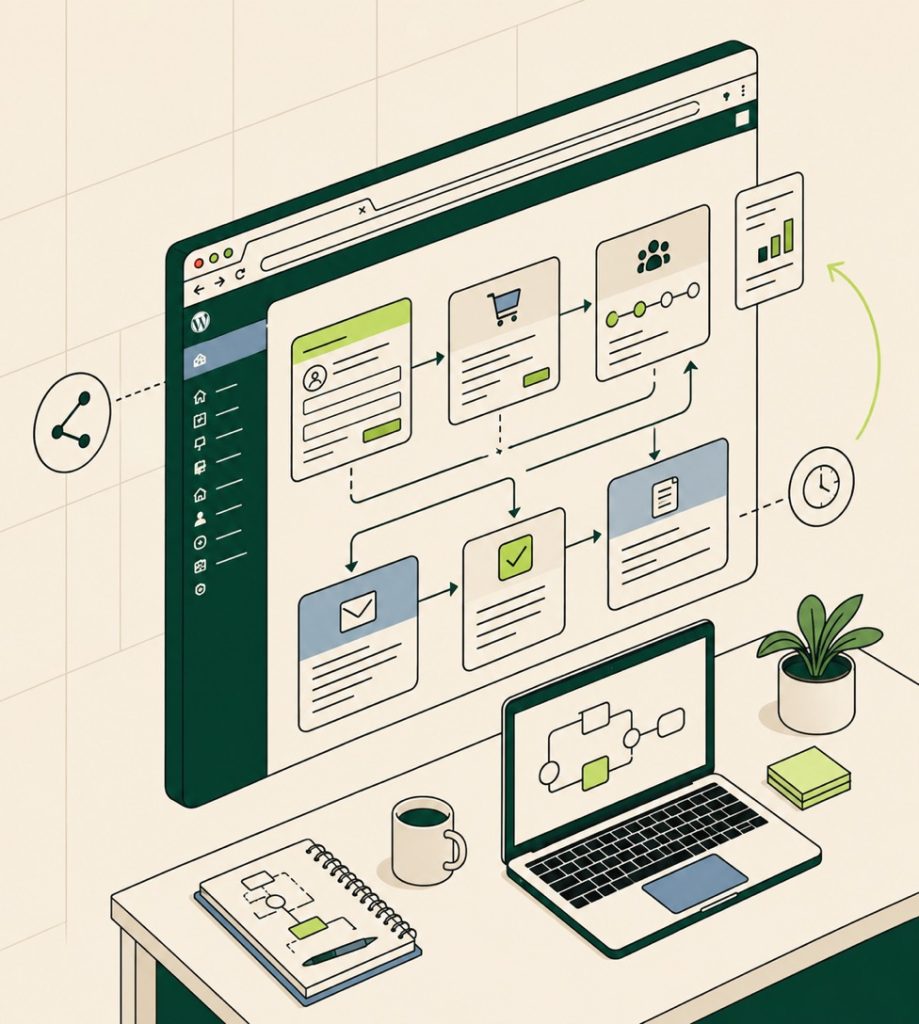
We connect WordPress forms, WooCommerce events, CRMs, email, helpdesks and internal tools into practical AI-assisted workflows for lead triage, summaries, support routing, order admin and follow-up.

Our approach

Less admin, more reliable follow-up .

Many teams use AI manually: copying WordPress form submissions into prompts, summarising enquiries, classifying support messages and drafting replies one by one. We turn the repeatable parts into workflows with clear review points.

The result is not blind automation. It is a controlled system where AI drafts, classifies, enriches or routes work, and your team approves the moments that affect customers, revenue or sensitive data.

  • Lead triage, enrichment and routing from WordPress forms
  • WooCommerce, CRM, email and support workflow automation
  • Approval steps before customer-facing or sensitive actions
Map an automation
WordPress AI automation workflow board connecting forms, orders, CRM and email
How it works

From repetitive tasks to reviewed workflows .

We find the repeatable work, decide where AI helps, and build the workflow with logs, retries, ownership and human checkpoints.

01

Workflow audit

We map the WordPress forms, WooCommerce events, emails, CRM steps, helpdesk queues and manual decisions your team repeats each week.

02

Automation design

We define triggers, AI tasks, review points, error handling, data boundaries and who owns each step.

03

Integration build

We connect WordPress to your CRM, email, helpdesk, spreadsheet, Slack channel or automation tool with tracking and fallback paths.

04

Testing and rollout

We test real examples, tune the prompts and hand over a runbook for monitoring and updates.

What's included

Everything needed for controlled AI automation .

  • Workflow audit and automation map
  • WordPress form, membership or WooCommerce trigger setup
  • AI prompt, summarisation and classification rules
  • CRM, email, Slack, spreadsheet or helpdesk connection
  • Human approval steps where needed
  • Logging, retry rules and failure notifications
  • Data boundary and privacy notes
  • Testing with real examples
  • Runbook and team handover
How we compare

Why teams avoid blind automation .

AI workflows need ownership, fallbacks, testing and data boundaries. Otherwise a clever shortcut becomes another thing the team has to babysit.

WP Pro Devs
Freelancer
Traditional agency
Workflow ownership mapped
Varies
WordPress and WooCommerce triggers configured
CRM or email integration
Varies
Human approval checkpoints
Logs and fallback rules
Varies
Team runbook included
Retainer only
WP Pro DevsRecommended
  • Workflow ownership mapped
  • WordPress and WooCommerce triggers configured
  • CRM or email integration
  • Human approval checkpoints
  • Logs and fallback rules
  • Team runbook included
What clients say
WP Pro Devs' work increased the client's website traffic by 300%. The team provided prompt responses, completed tasks within a week, and demonstrated strong skills and creativity, fostering a trusted relationship with the client.
A
Andrej Spajic Founder, NetWaver
We love our brand and yes, we're total control freaks. Handing our website to someone on the other side of the world was terrifying. But WP Pro Devs absolute legend, exceeded our sky high standards. Calm, patient, and genuinely invested in the relationship as much as the code.
S
Sean Founder, Hidden Africa
Working with WP Pro Devs in website development was an exceptional experience. He showcased incredible professionalism and exceeded expectations in every aspect, ensuring a very fast delivery with proactive communication. Highly recommend his supportive and adaptive approach.
J
Joris Founder, We Move Sports
Great work. Very knowledgeable and easy to collaborate with. I'll definitely entrust him with future projects as well.
C
Ceci Project Lead, Dongfeng Singapore
WP Pro Devs truly shines in website development with exceptional code expertise and professionalism. His attention to detail and quick responsiveness make collaboration a breeze, and his language fluency ensures clear communication. The team is friendly, insightful, and a powerhouse for delivering high-quality work swiftly.
A
Amanda Marketing Lead, JMEV
WP Pro Devs did an excellent job on a demanding project. He was patient and made all the necessary changes to ensure everything was perfect. Highly recommend.
m
mikoajtobjasz Verified Upwork client
I will work with him again in future projects. It's quick and easy. I am very satisfied. I wanted a website without Elementor and he delivered a great website that came in a great time.
g
guidomarsch994 Verified Upwork client
Pricing

Fixed scope, clear outcomes .

Start with a focused audit or setup, then move into implementation and monthly improvement. Pricing depends on the number of pages, workflows, integrations and review controls involved.

Starter $2k to $4k

A focused setup for one clear workflow, audience or content area.

  • Discovery and written scope
  • One workflow, audience or content area
  • WordPress setup or audit report
  • Basic tracking, QA and handover
  • 30 day launch support
Recommended
Studio $4k to $8k

A complete business-ready implementation with handover and launch support.

  • Everything in Starter
  • Multiple journeys, prompts or content types
  • CRM, email, analytics or SEO connection
  • QA, prompt testing and revisions
  • 60 day launch support
Scale $8k to $14k

A deeper build across several teams, systems or content libraries.

  • Everything in Studio
  • Advanced workflows and approval rules
  • Custom plugin, schema or integration work
  • Training session and runbook
  • 90 day support window
Enterprise $14k+

An ongoing managed programme with governance, reporting and iteration.

  • Everything in Scale
  • Governance for multiple teams
  • Security and compliance review
  • Priority response SLA
  • Ongoing monthly optimisation
Quality standards

Every workflow keeps humans in charge .

Automation should save time without creating silent failures, bad promises or confusing ownership.

Clear trigger rules

The workflow only runs from defined WordPress, WooCommerce, CRM or form events.

Approval where it matters

Drafts, classifications and enrichment can be reviewed before customer-facing actions happen.

Failure paths

Errors create notifications or logs instead of disappearing quietly.

Prompt versioning

Important prompts are documented so changes can be reviewed and rolled back.

Data boundaries

We limit what customer, order, lead or support data moves into AI tools and document the flow.

Real-case testing

The workflow is tested against your actual enquiries, products or support examples.

For agencies

Your AI offer. Our WordPress delivery. Your brand.

We help agencies offer practical AI-enabled WordPress services without hiring a specialist team first. Your client sees your strategy, your process and your brand while we handle the technical build quietly in the background.

  • 01

    Partner-friendly scoping

    We turn a loose AI request into a fixed deliverable you can quote with confidence.

  • 02

    Branded implementation

    Admin labels, handover docs and client-facing notes can carry your agency identity.

  • 03

    Real engineering support

    WordPress developers handle the integrations, privacy controls and launch QA.

  • 04

    Ongoing optimisation

    Retainers can cover prompt testing, reporting, content updates and workflow improvements.

Become a partner

How it works

01
Step 1

Share the client request

Send the goal, website URL, tools involved and any client constraints.

02
Step 2

Shape the technical scope

We define the data, pages, prompts, integrations, testing and handover requirements.

03
Step 3

Quote under your brand

You add your strategy, margin and client-facing proposal.

04
Step 4

Build and test

We implement on staging, test real scenarios and document what your team needs to support.

05
Step 5

Launch with the client

You present the work, collect feedback and keep the account relationship.

06
Step 6

Support the next iteration

We stay available for fixes, reporting and improvements after launch.

Common questions

What clients ask us about AI services.

What WordPress tasks can AI automation handle?

Good first workflows include lead summaries, CRM updates, enquiry routing, support ticket classification, follow-up drafts, WooCommerce order notes and internal admin notifications.

Can you automate WooCommerce workflows?

Yes. We can automate order summaries, fulfilment alerts, customer-service routing, review requests, abandoned-cart follow-up drafts and product-admin workflows.

Do we need a specific AI tool?

No. We recommend the simplest fit based on your workflow, privacy needs, budget and existing tools.

Can a human approve before anything is sent?

Yes. We usually design approval steps for customer-facing replies, sales follow-ups or sensitive decisions.

Can this connect with Zapier, Make or n8n?

Yes. We can use Zapier, Make or n8n when they fit, or build a custom WordPress integration when reliability, cost or ownership requires it.

How do you stop AI automation from making mistakes?

We use narrow prompts, defined triggers, approval steps, logs, fallback rules and testing with real examples. Sensitive or customer-facing actions can stay human-reviewed.

Start your project

Tell us what you need built.

    Project brief
    avg. reply . 4h

    No spam, no sequences. One human reply.